Affiliate disclosure: PicksLab earns commissions on qualifying Amazon purchases via the pickslab-20 tag, at no extra cost to you.
Do you finish a workday with your hand still shaped around the mouse? Maybe you’re gripping a little travel mouse too tightly, reaching past a full-size keyboard, or constantly lifting it because there isn’t enough room beside your laptop. Buying something labeled ergonomic can help change the setup, but the shape has to solve the problem you’re actually having.
A vertical mouse turns your grip onto its side. A trackball stays in place while your fingers move the pointer. A sculpted mouse keeps familiar movement while adding a thumb rest and useful shortcuts. Those are different approaches, not a simple ranking from cheap to healthy.
TL;DR - Our top pick: The Logitech Lift is our starting point for a small-to-medium right hand trying a vertical grip. A larger hand should look at the MX Vertical. If moving the whole mouse is the problem, the Kensington trackball changes that movement more substantially. None should be bought as a promised treatment for wrist pain.
Price Comparison
Ordinary new US Amazon offers checked October 29, 2026, sorted low to high. Prices exclude taxes and any delivery charges; logged-in delivery benefits can differ for other buyers. No coupon, Prime-only discount, used offer or business pricing is included.
| Product | Price checked | Main reason to consider it | Before you buy |
|---|---|---|---|
| Anker A7852 wireless vertical mouse | $29.99 | Inexpensive vertical-grip option | Right-handed; two AAA batteries extra; USB-A receiver required |
| Logitech Lift, right-handed graphite | $63.49 | Smaller vertical grip with Bluetooth and Bolt | This link is not the left-handed version |
| Logitech MX Vertical | $74.99 | Larger vertical grip with rechargeable power | Unifying receiver, not Logi Bolt |
| Razer Pro Click V2 | $89.99 | Familiar mouse movement with more controls | Right-handed standard model, not Vertical Edition |
| Kensington Expert Wireless K72359WW | $90.35 | Stationary, finger-operated trackball | Older model; check current driver support for your computer |
The Anker offer was sold by AnkerDirect and shipped by Amazon. Lift was sold by Abe’s Electronics Center and shipped by Amazon. The other three checked offers were sold and shipped by Amazon.com. Don’t substitute a renewed listing or a different receiver package when comparing prices.
Feature Comparison
| Product | Grip and pointer movement | Connection and power | Controls that matter |
|---|---|---|---|
| Anker A7852 | Right-handed vertical; move the whole mouse | 2.4GHz USB receiver; two AAA batteries | Five buttons; 800/1200/1600 DPI selector; Mac thumb-button limit |
| Logitech Lift | 57-degree grip; small-to-medium hand | Bluetooth or Bolt; one AA battery | Six buttons, four customizable; up to three paired devices |
| Logitech MX Vertical | 57-degree grip; medium-to-large hand | Bluetooth, Unifying or USB cable; rechargeable | Pointer-speed switch; up to three paired devices |
| Razer Pro Click V2 | Sculpted right-handed grip with extended thumb support | 2.4GHz, three Bluetooth profiles or wired USB-C; rechargeable | Nine programmable controls; tactile/free-spin scroll modes |
| Kensington Expert Wireless | Ambidextrous finger ball; base stays still | Bluetooth LE or USB receiver; AA batteries | Four buttons and a scroll ring; 55mm ball |
Change the movement that bothers you
Before spending anything, put the mouse close enough that your upper arm can stay near your body. Check whether the desk edge presses into your wrist and whether you’re bending your wrist sideways to reach the buttons. OSHA’s pointing-device guidance emphasizes fit, placement and neutral positioning, not a particular brand or an expensive sensor.
Then separate three questions. Is the grip wrong? A vertical design changes forearm orientation, but an oversized shell can still force you to stretch for a click. Is movement the issue? A trackball removes repeated movement of the base, while shifting the work to your fingers. Are repeated actions the nuisance? A programmable button or a free-spinning wheel may matter more than a dramatic new shape.
Try the same ordinary tasks with a candidate: select a paragraph, drag a window, make a precise spreadsheet selection and scroll a long document. Can you do them without squeezing harder, cocking your wrist or reaching for the thumb buttons? Treat that as a fit check, not a timed endurance challenge. Stop if it aggravates symptoms. Persistent pain, tingling, numbness or weakness deserves professional assessment rather than another product promise.
A narrower keyboard can also make room beside your hand; our developer keyboard guide explains layout tradeoffs. For a two-computer desk, USB switches and KVMs are a separate way to share peripherals. A mouse with three Bluetooth pairings doesn’t share a monitor or automatically move every other accessory with it.
1. Anker A7852 Wireless Vertical Mouse
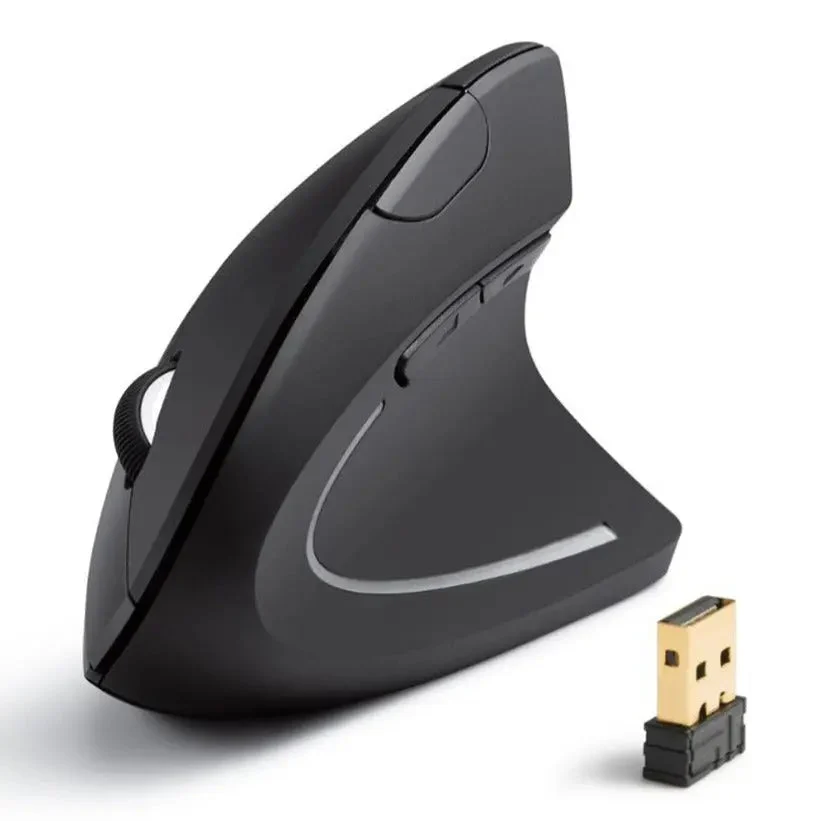 Product image and model specifications: Anker.
Key specs: Connection: 2.4GHz USB receiver; Sensitivity settings: 800, 1200 and 1600 DPI; Buttons: five; Power: two AAA batteries, not included.
At $29.99, this is the low-cost way into a vertical shape without adding software or a charging routine. The button behind the wheel changes pointer sensitivity, while the two thumb buttons handle backward and forward navigation on supported systems.
It is the budget choice for someone who wants a basic right-handed vertical mouse and has a USB-A port available. Don’t confuse wireless with Bluetooth: its receiver needs a port, or a suitable adapter on a USB-C-only laptop. Keep spare batteries in the cost calculation.
Skip it if Bluetooth pairing, extensive remapping or reliable Mac thumb-button behavior is essential. Anker’s model page says the next/previous-page buttons aren’t recognized on Mac OS X. There is no official configuration app required here; use its physical DPI selector and operating-system pointer settings. The attraction is simplicity, not matching the Lift’s device switching and software controls.
2. Logitech Lift, Right-Handed Graphite
Buy Logitech Lift on Amazon ->
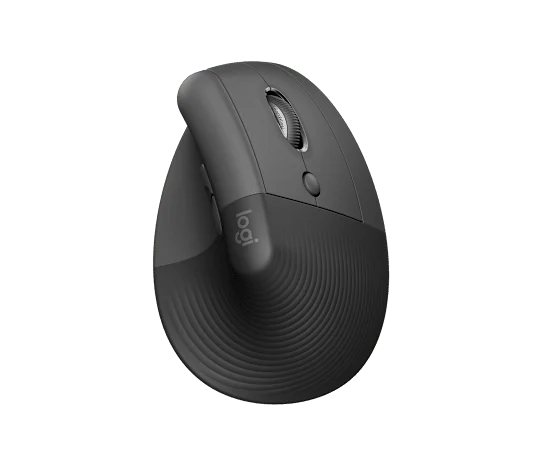 Product image: Logitech.
Key specs: Grip angle: 57 degrees; Intended fit: small-to-medium hands; Connection: Bluetooth or Logi Bolt; Power: one AA battery.
The $63.49 Lift is the place we’d start for a smaller hand. The point is not that 57 degrees cures anything; it’s that the shell changes how you hold the mouse without making the body as large as the MX Vertical. The thumb rest and raised grip are useful only if your fingers still reach the controls comfortably.
It is the most balanced starting point here for a small-to-medium right hand that wants a vertical grip and flexible connections. Logitech’s Lift specification lists six buttons, four customizable controls and up to 24 months from the AA battery under its usage conditions. Battery life isn’t a fixed replacement schedule.
Skip this linked version if you need a left-handed mouse; Logitech sells a separate left-handed Lift. For customization, Logi Options+ currently lists Windows 10 or later and macOS 14 or later. Basic pointing and pairing are separate from those software features. Check employer installation restrictions before buying for a managed work computer.
3. Logitech MX Vertical
Buy Logitech MX Vertical on Amazon ->
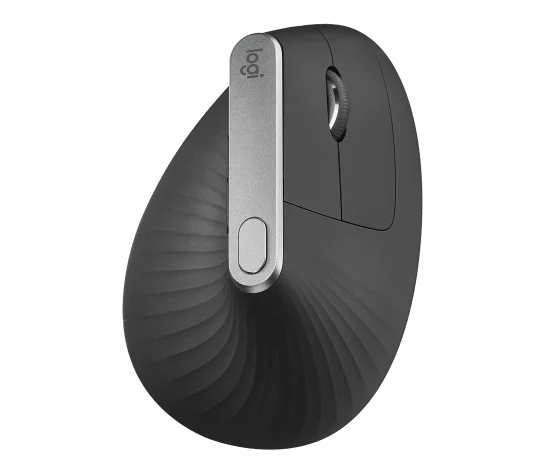 Product image: Logitech.
Key specs: Grip angle: 57 degrees; Intended fit: medium-to-large hands; Sensor range: 400-4000 DPI; Connections: Bluetooth, Unifying receiver and USB cable.
At $74.99, the MX Vertical is the larger-hand alternative, not an automatic upgrade for every Lift buyer. Its top speed button changes how far the pointer moves for a given hand movement. That can be useful when moving between detailed selections and a large display, provided the setting still lets you place the pointer accurately.
It is the better fit to investigate when the Lift feels too small and you prefer rechargeable power. The technical specifications establish the sensor and connections; Logitech’s setup guide covers pairing and the speed control.
Skip it if you need a left-handed shape or expect it to share a Bolt receiver with newer Logitech hardware. It uses Unifying, a different receiver system. Customization uses Logi Options+, currently Windows 10 or later or macOS 14 or later. Don’t assume basic Bluetooth compatibility means every customization feature works on your OS. A taller mouse also changes where your hand lands when moving back from the keyboard, so assess that transition as well as the grip.
4. Razer Pro Click V2
Buy Razer Pro Click V2 on Amazon ->
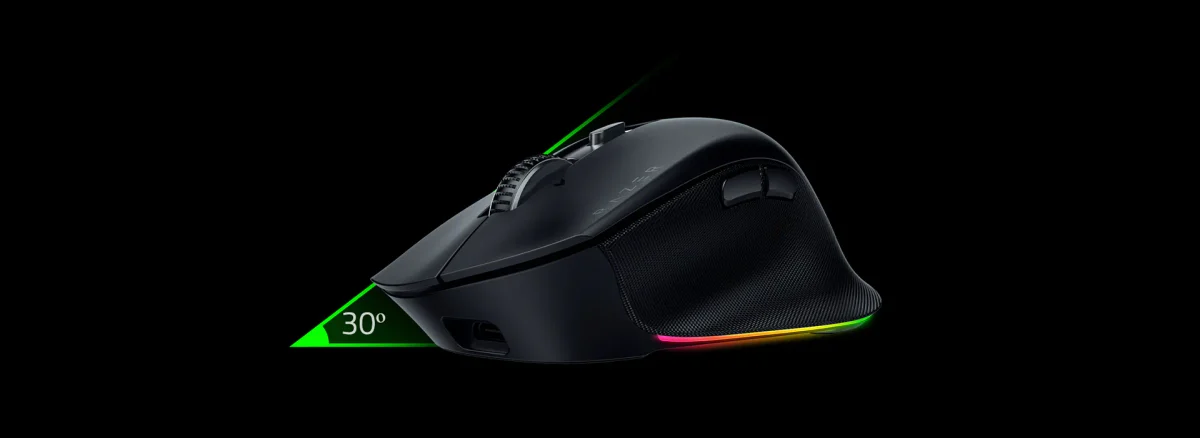 Product image and feature overview: Razer.
Key specs: Shape: right-handed with extended thumb rest; Programmable controls: nine; Connections: 2.4GHz, three Bluetooth profiles and wired USB-C; Sensor: Focus Pro 30K optical.
The $89.99 Pro Click V2 is for someone who wants more support and shortcuts without moving to a fully upright mouse. This is the standard Pro Click V2, not the similarly named Vertical Edition. Its wheel switches between tactile steps and free-spinning movement, useful for changing from precise spreadsheet work to a long document.
It suits someone who prefers familiar mouse movement and will use the extra controls for everyday work. Maximum DPI is not a comfort score; reach and button placement are more relevant here. Nor is the advertised AI shortcut a reason to buy a new mouse by itself.
Skip it if you want a simple left-handed device or can’t install software for the features you want. Use the official Synapse download for customization, and Synapse for Mac on supported Apple-silicon Macs. The model manual specifies macOS 15 and Apple silicon for Mac configuration. On Windows, use Windows 11: Razer’s October 21 release notes say full Windows 10 support has ended. Basic pointer operation is not full software support.
5. Kensington Expert Wireless Trackball K72359WW
Buy Kensington Expert Wireless on Amazon ->
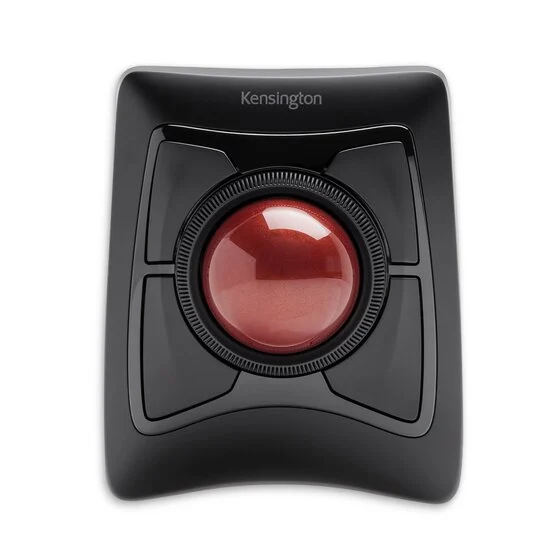 Product image and specifications: Kensington.
Key specs: Ball diameter: 55mm; Ball control: fingers; Buttons: four; Connections: Bluetooth LE or 2.4GHz USB receiver.
The $90.35 Expert makes the biggest change to pointer movement in this list. The base stays on the desk, your fingers roll the ball, and the ring around it scrolls the page. Its ambidextrous layout also differs from the right-handed mice linked above.
It is worth considering when repeatedly moving a mouse across the desk is the part you want to change. It does not eliminate hand activity: the work moves to your fingers. Kensington describes the fit as average-to-larger hands, so don’t assume every trackball suits every user.
Skip it when you want familiar mouse movement or haven’t resolved driver compatibility. Kensington marks this older model no longer available directly, although the checked Amazon new offer was in stock. Its support section links Kensington Konnect for Trackballs and Mice, with Windows 10+ and macOS 13+ downloads. ChromeOS basic pointing is different from customization. The older product page warns about Windows ARM while also listing some ARM devices, so Windows ARM customization remains unclear: confirm it with Kensington before buying for that requirement.
A better mouse still needs a usable place to sit
Don’t create a new reach problem while solving a grip problem. Keep the keyboard and pointing device at compatible heights and leave room to move naturally. A giant mouse mat won’t fix a keyboard pushed against the desk edge, and an armrest that holds your elbow too high can work against the new setup.
Wrist supports also need some thought. OSHA’s wrist/palm-support guidance distinguishes resting between tasks from pressing the wrist into a support while actively typing or pointing. A padded accessory isn’t automatically helping just because it feels soft.
For a large display, start with pointer speed that lets you reach the screen without overshooting, then adjust it deliberately. Our ultrawide monitor guide covers the display side of that workspace decision. Buying a new monitor and a new mouse at once can otherwise make it hard to tell which change improved the setup.
Who Should Buy What
- Low-cost vertical grip, basic controls: Anker A7852, provided its receiver and Mac limitations fit your computer.
- Small-to-medium right hand: Logitech Lift; a separate left-handed version is available from Logitech.
- Larger right hand and rechargeable power: MX Vertical, remembering that Unifying is not Bolt.
- Familiar movement plus programmable controls: Razer Pro Click V2, after checking configuration-software support.
- A stationary device operated with either hand: Kensington Expert Wireless, if its size and driver situation work for you.
FAQ
Will an ergonomic mouse fix wrist pain?
No mouse can promise that. A different grip or movement pattern may suit your workstation better, but discomfort can have several causes. Review placement and fit as well as the device. Persistent pain, numbness, tingling or weakness calls for professional assessment, not a claim that a particular angle cures it.
Is a vertical mouse better than a trackball?
They change different things. A vertical mouse changes your grip while you still move the device across the desk. A finger trackball stays still but asks your fingers to roll the ball. Start with the movement you want to change, then check whether the controls remain comfortable to reach.
Which of these works for a left-handed user?
The Kensington Expert is ambidextrous. Logitech also offers a separate left-handed Lift, but the Amazon Lift link on this page is the right-handed graphite version. The Anker, MX Vertical and standard Pro Click V2 linked here are right-handed designs.
Can I use them on a work laptop without installing anything?
Basic pointing often uses the operating system’s standard device support, but extra controls and customization can require vendor software and a supported OS. Ask your IT team before choosing a mouse mainly for remapping. Anker uses physical DPI controls; Logitech, Razer and Kensington have configuration software with the limits described above.
Bottom Line
The Logitech Lift is a reasonable first candidate for a smaller right hand, not a universal winner for wrist pain. Spend according to fit and the movement you want to change. A mouse you can hold lightly, reach easily and use with your actual computer is more useful than an impressive specification attached to the wrong shape.
This article contains affiliate links. PicksLab may earn a small commission at no extra cost to you. Our recommendations are based on the review method described in this article.