Affiliate disclosure: PicksLab earns commissions on qualifying Amazon purchases via the pickslab-20 tag, at no extra cost to you.
TL;DR - Our top pick: HUANUO FlowLift Dual Monitor Stand fits the most common two-screen desk setup, supports up to 32-inch displays and 19.8 pounds per arm, and includes clamp and grommet mounting.
A dual-monitor arm should be chosen by monitor weight, VESA pattern, desk construction, and layout before brand or price. Screen size alone is not enough: two 32-inch monitors can have very different weights, and a thick desk apron can make an otherwise compatible clamp unusable.
We compared current US listings with active purchase controls, checked the published load and mounting limits, and separated the picks by the problem each one solves. For the rest of the workstation, our guides to cable management kits, ultrawide productivity monitors, and Thunderbolt 4 docks cover the adjacent decisions. An arm positions two screens; if both screens and your keyboard must switch between a work and personal computer, compare two-computer KVM video and USB connections separately.
| Pick | Best For | Key Difference |
|---|---|---|
| HUANUO FlowLift Dual Monitor Stand | Most side-by-side desks | Gas-spring arms, 19.8 lb per screen |
| Mount-It MI-1768 Vertical Dual Monitor Mount | Tall stacked layout | Independent heads on a 35-inch pole |
| MOUNT PRO PR7002 Dual Monitor Wall Mount | Permanent wall-mounted setups | Gas-spring arms, 19.8 lb per screen |
| Perlegear PGTVS41B Freestanding Stand | Desks that cannot be clamped | Tempered-glass base and built-in power strip |
| MOUNT PRO Vertical Dual Monitor Stand | Lower-cost stacked setup | 31-inch pole and two mounting methods |
Feature Comparison
| Product | Screen Range | Capacity Per Screen | Mounting Method | VESA |
|---|---|---|---|---|
| HUANUO FlowLift | 13-32 in | 4.4-19.8 lb | Clamp or grommet | 75x75, 100x100 |
| Mount-It MI-1768 | 13-32 in | Up to 17.6 lb | Clamp or grommet | 75x75, 100x100 |
| MOUNT PRO PR7002 Wall Mount | 13-32 in | 4.4-19.8 lb | Wall stud, concrete, or brick | 75x75, 100x100 |
| Perlegear PGTVS41B | 13-32 in | Up to 22 lb | Freestanding base | 75x75, 100x100 |
| MOUNT PRO Vertical | 13-32 in | Up to 17.6 lb | Clamp or grommet | 75x75, 100x100 |
1. HUANUO FlowLift Dual Monitor Stand
Buy the HUANUO FlowLift on Amazon ->
The HUANUO FlowLift is the most broadly useful pick for two conventional flat or curved monitors. Each arm supports a 13- to 32-inch screen weighing 4.4 to 19.8 pounds, with 75x75mm or 100x100mm VESA holes. The package supports both edge clamping and grommet installation.
Its gas-spring arms are the important distinction from fixed heads on a tall pole. Each screen can move closer, farther away, higher, lower, or into portrait orientation without dismantling the setup. That makes it a better fit for shared desks, sit-stand desks, and work that alternates between focused and collaborative screen positions.
Desk compatibility is stricter than the headline screen range. HUANUO specifies wooden desks from 0.59 to 3.54 inches thick and warns that crossbeams or panels under the mounting point can block installation. Owners of glass, hollow-core, or unusually thin desktops should skip it unless the desk manufacturer explicitly approves clamp mounting.
2. Mount-It MI-1768 Vertical Dual Monitor Mount
Buy the Mount-It MI-1768 on Amazon ->
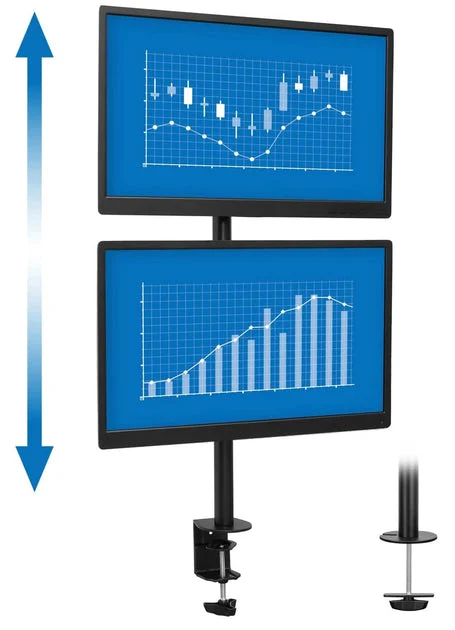
Image credit: Mount-It!.
The MI-1768 places one monitor above the other on a 35-inch pole. It supports 13- to 32-inch screens up to 17.6 pounds each, with the standard 75x75mm and 100x100mm VESA patterns. Clamp and grommet hardware are included for desks up to 3.5 inches thick.
This is a deliberate fixed-pole layout, not a gas-spring arm pretending to be one. Each monitor head slides independently on the pole and provides tilt, swivel, and portrait or landscape rotation. That makes it useful for code, chat, dashboards, and reference material where a top screen can remain visible without consuming horizontal desk width.
The tradeoff is reach. The heads do not swing forward and outward like long articulated arms, so this is best when the screens can remain centered. It is also a poor choice for a top monitor that would sit above a comfortable viewing angle; measure the screen heights and intended eye line before ordering.
3. MOUNT PRO PR7002 Dual Monitor Wall Mount
Buy the MOUNT PRO PR7002 on Amazon ->
The MOUNT PRO PR7002 moves two ordinary office or gaming monitors off the desk and onto the wall. Each gas-spring arm supports a 13- to 32-inch screen weighing 4.4 to 19.8 pounds, with 75x75mm or 100x100mm VESA mounting holes.
Each arm can extend roughly 20 inches from the wall, swivel, tilt, rotate, and move vertically. This preserves the rear desk edge for speakers, lighting, or a cable tray while allowing the two screens to move independently. It is a better wall-mounted fit for conventional monitors than for heavy 34- or 49-inch ultrawides.
Installation is the deciding constraint. The bracket must anchor to wood studs, solid concrete, or brick, never unsupported drywall. Buyers who cannot verify wall structure, renters who cannot drill, and anyone likely to relocate the desk should choose a desk-mounted or freestanding pick instead. Check both monitor weights before ordering because the per-arm limit is lower than the limits on specialized ultrawide mounts.
4. Perlegear PGTVS41B Freestanding Dual Monitor Stand
Buy the Perlegear PGTVS41B on Amazon ->
The Perlegear PGTVS41B solves a problem most arm roundups ignore: some desks cannot safely accept a clamp or grommet. Its tempered-glass base sits on the desktop and supports two 13- to 32-inch screens up to 22 pounds each. The arms tilt, swivel, rotate, and offer four height positions.
The base also contains three AC outlets, one USB-A port, and one USB-C port on a 6.5-foot power cable. That can reduce the number of cords running off the rear edge, especially when the desk already has a laptop charger, speakers, and phone charging in addition to two monitors.
Freestanding does not mean space-free. The glass base occupies part of the work surface, and the combined center of gravity remains on the desktop. Skip this pick when reclaiming every inch of desk depth is the main goal, or when children, pets, or frequent desk movement make a heavy glass base undesirable.
Our dedicated Perlegear PGTVS41B review covers its exact compatibility limits, integrated power strip, base footprint, and clamp-free tradeoffs in more detail.
5. MOUNT PRO Vertical Dual Monitor Stand
Buy the MOUNT PRO vertical stand on Amazon ->
The MOUNT PRO is a simpler stacked alternative for two screens up to 32 inches and 17.6 pounds each. Its 31-inch center pole supports independent height placement, tilt, swivel, and portrait or landscape rotation. Both clamp and grommet mounting are supported.
It works best for lighter monitors that remain in a stable top-and-bottom arrangement. The pole design saves width and avoids the drifting alignment that can happen when two independent gas arms are forced into a vertical stack.
Its shorter pole and lower weight ceiling provide less margin than the Mount-It pick. MOUNT PRO lists clamp compatibility up to 3.15 inches and grommet mounting up to 1.57 inches, so measure the desk and the total height of both monitor panels before choosing it. Buyers with heavier 32-inch screens should move to the Perlegear option or a purpose-built heavy-duty arm.
How to Check Compatibility Before Ordering
Start with the monitor’s weight without its factory stand. Leave useful headroom below the arm’s maximum rather than treating the published limit as a target. A VESA adapter also adds weight and can move the center of gravity farther from the arm.
Next, check the VESA hole pattern. Every pick here supports 75x75mm and 100x100mm patterns, but some large ultrawides require a manufacturer adapter or a larger pattern. Confirm the exact display model before assuming that screen size guarantees compatibility.
Finally, inspect the desk from above and below. Measure thickness at the actual mounting point, look for an apron or cable tray that blocks the clamp, and confirm that the material can handle a concentrated load. A clamp reinforcement plate can spread pressure, but it cannot turn hollow or damaged material into a sound mounting surface.
Who Should Buy What
- For a conventional side-by-side workstation: choose the HUANUO FlowLift for independent gas-spring positioning.
- For a narrow desk with vertically stacked screens: choose the Mount-It MI-1768 for its taller pole and independent screen heads.
- For two conventional monitors and a clear desk edge: choose the MOUNT PRO PR7002 wall mount only when the wall structure supports proper installation.
- For a desk that cannot be drilled or clamped: choose the Perlegear PGTVS41B and accept the base footprint.
- For a lower-cost fixed stack: choose the MOUNT PRO vertical stand after checking pole height and monitor weight.
FAQ
Can a dual monitor arm hold two 32-inch monitors?
Yes, if each screen falls within the mount’s per-arm weight range and uses a supported VESA pattern. Check the monitor weight without its factory stand. A 32-inch size claim does not override a lower weight limit, and curved gaming displays can be substantially heavier than office panels of the same diagonal size.
Is a stacked monitor layout ergonomic?
It can be when the lower screen remains near eye level and the upper screen is used for secondary information. A top display that requires constant neck extension is not a good primary screen. Measure the combined panel heights and place the screen used most often directly in front of you.
Can I clamp a monitor arm to a standing desk?
Usually, but the desktop must meet the mount’s thickness and material requirements, and the underside must be clear at the clamp point. Leave enough cable slack for the desk’s full travel. Our standing desk guide covers desk dimensions and load planning.
Should I use a wall mount instead of a desk clamp?
A wall mount is useful for heavy displays, shallow desks, or permanent installations where the rear desk edge must remain clear. It requires structurally sound mounting into studs, concrete, or brick. A desk arm is easier to relocate and avoids wall drilling, while a freestanding stand avoids both constraints at the cost of desktop space.
Bottom Line
The HUANUO FlowLift Dual Monitor Stand is the best fit for the largest share of ordinary two-monitor desks because it combines a useful weight range with independent gas-spring adjustment and two installation methods. Choose a stacked, wall-mounted, or freestanding design only when that mounting style solves a specific workspace constraint.
PicksLab is reader-supported. We may earn a commission from qualifying purchases, at no additional cost to you. Our recommendations are based on published specifications, current availability, and use-case fit. Read our methodology and affiliate disclosure.